Verify the install
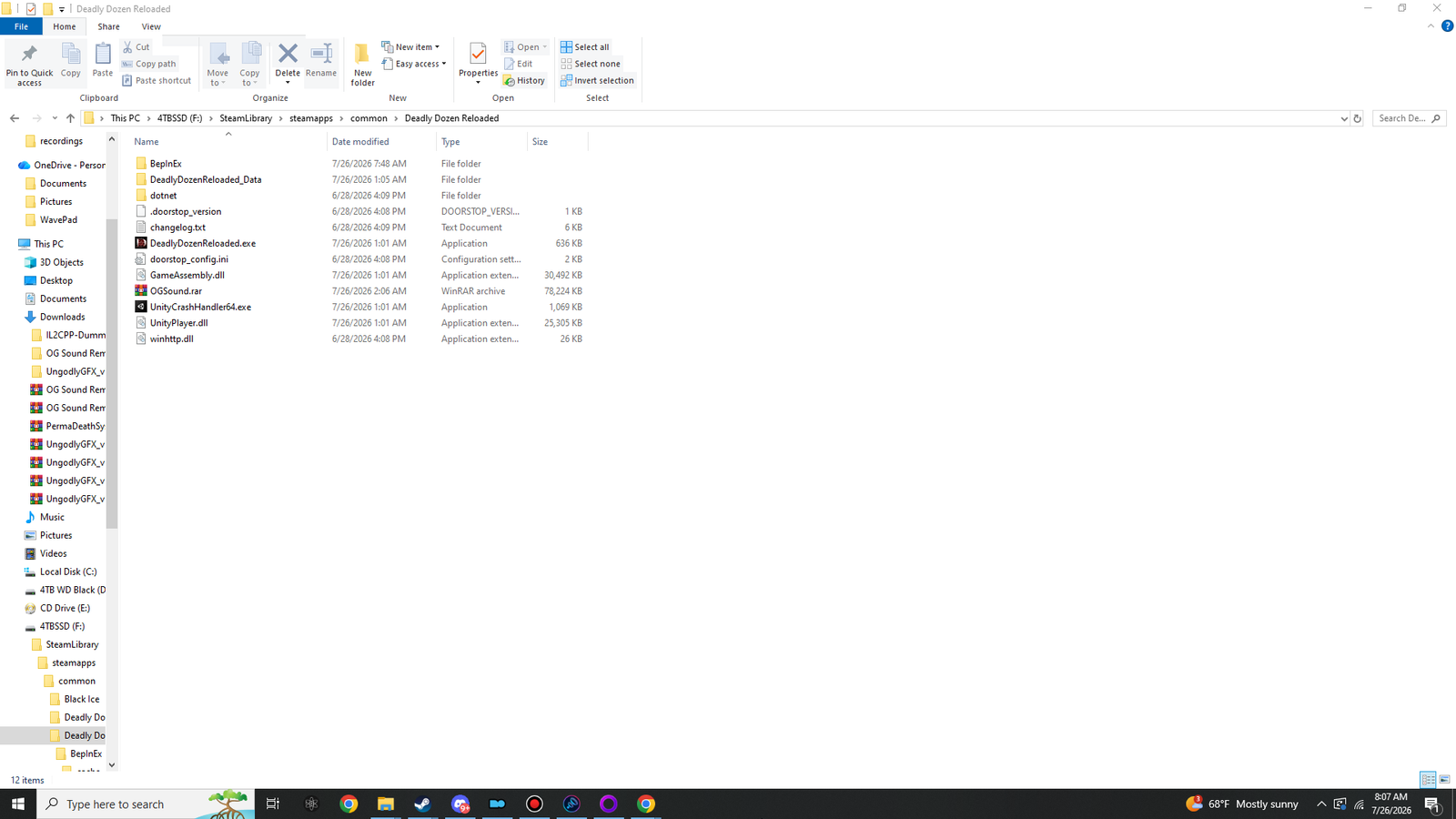
Four reference plates of a known-good install, taken on a real machine, at four levels of the directory tree. Compare yours against them. If all four match and the log lines below are present, you are finished and section 08 is where to go next.
01 The game root
 View at 1920×1080
winhttp.dll, doorstop_config.ini, .doorstop_version, the dotnet folder and the BepInEx folder sitting beside DeadlyDozenReloaded.exe.
Twelve items. Working down the listing:
| Item | Source | Notes |
|---|---|---|
BepInEx\ | you | The loader and both plugins. |
DeadlyDozenReloaded_Data\ | game | Shipped. Untouched by everything in this manual. |
dotnet\ | you | The self-contained CoreCLR runtime BepInEx runs on. |
.doorstop_version | you | 1 KB. Contains the line 4.5.0. |
changelog.txt | you | 6 KB. BepInEx's own changelog. Harmless, reference only. |
DeadlyDozenReloaded.exe | game | 636 KB. The anchor — everything else is positioned relative to this. |
doorstop_config.ini | you | 2 KB. What the injector loads and where the runtime is. |
GameAssembly.dll | game | 30,492 KB. The compiled game. Cpp2IL read this in section 03. |
UnityCrashHandler64.exe | game | Shipped. The 64 in the name is your architecture confirmation. |
UnityPlayer.dll | game | 25,305 KB. Shipped. |
winhttp.dll | you | 26 KB. Doorstop. If this is missing, nothing loads. |
02 Inside BepInEx
 View at 1920×1080
cache, config, interop and unity-libs carry the first-run timestamp — BepInEx created or filled them itself. core and patchers still carry the build date from the archive.
Nine items: seven folders and two logs. Four of the folders were created by BepInEx during the first launch, and the timestamps in the plate show it clearly.
- cache\ Cpp2IL output and the hash that decides whether to regenerate
- config\ BepInEx.cfg plus the Ungodly GFX config — see task 4
- core\ 39 assemblies from the archive. Still carries the build date.
- interop\ The critical one. Missing or empty = section 03 never finished.
- patchers\ Empty, and correctly so.
- plugins\ Your plugins — see task 3
- unity-libs\ Your pre-seeded 2019.4.9.zip, now extracted alongside itself
- ErrorLog.log Only what went wrong. Small is good.
- LogOutput.log Everything, rewritten every launch. ~9 KB on a healthy run.
- You copy this in
- BepInEx creates this on first run
- Shipped with the game — do not touch
- Delete this and nothing loads
03 The plugins folder
 View at 1920×1080
UngodlyGFX.dll sits loose in plugins; OG Sound Remaster gets its own OGSoundRemaster folder because its 526-file audio bank has to travel with the DLL.
Entries here are deliberately different shapes:
-
UngodlyGFX.dll— a loose file. 262 KB. It has no companion assets, so it needs no folder. -
OGSoundRemaster\— a folder. Contains the DLL and the 526-fileOGSoundbank, which has to travel with it. -
PermaDeathSystem\— a folder, if you installed section 06. Contains a single 50 KB DLL; the folder exists so the ledger, memorial wall and campaign archive it writes stay together with it.
04 The config folder
 View at 1920×1080
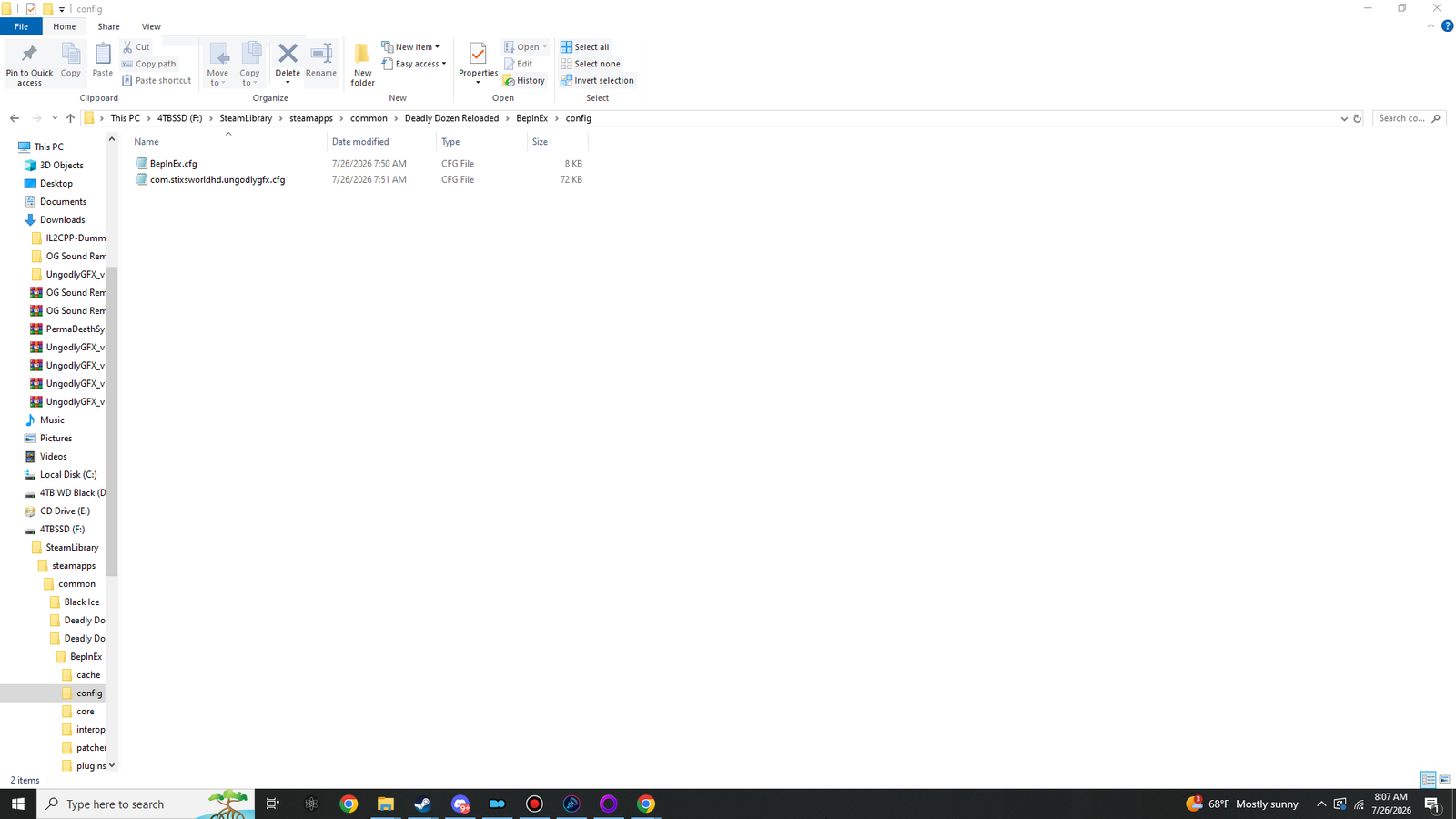
BepInEx.cfg is the loader's own, written on first run. com.stixsworldhd.ungodlygfx.cfg is the graphics plugin. OG Sound Remaster deliberately never creates one.
Two files. Not one, not three — however many plugins you installed.
| File | Size | What it is |
|---|---|---|
BepInEx.cfg | ~8 KB | The loader's own settings, written on the first launch. This is where you turned the console on in section 03. |
com.stixsworldhd.ungodlygfx.cfg | ~72 KB | All 210 Ungodly GFX settings across 22 sections, each with a documentation comment. Back this one up once you have it tuned. |
05 The log check
Open BepInEx\LogOutput.log in Notepad after a launch. On a fully working install you
should be able to find all six of these, in roughly this order:
| # | Look for | Proves |
|---|---|---|
| 1 | A BepInEx version banner naming 6.0.0-be.785 | The loader was injected. If this is missing, nothing else below can happen. |
| 2 | A Unity version line reading 2019.4.9 | The version your pre-seeded base-libraries zip is named after. |
| 3 | Interop assemblies loaded from cache, not regenerated | Section 03 finished and its work is being reused. |
| 4 | A plugin count matching what you installed | One line per plugin found in plugins\ — 3 plugins to load if you took all three. |
| 5 | An Ungodly GFX v1.1.0 banner | Graphics plugin alive. |
| 6 | An OG Sound Remaster v1.0.1 banner and a bank count of 526 | Audio plugin alive and its bank found. |
Then open BepInEx\ErrorLog.log. On a clean install it is small and often empty.
Anything in it is worth reading — that file only receives things that actually went wrong.
06 The in-game check
A minute, and it exercises every part of the install at once:
- Start mission 1.
- The briefing narration should be the 2002 voice actor. That is OG Sound Remaster.
- Press F7. The Ungodly GFX window should open. That is the graphics plugin.
- Press Rescan. Terrain, water and weather counts should now be non-zero. That is the plugin reaching the loaded world.
- Order a squad member to move. You should hear an original American voice pack.
- Drop fog density trim to
0.35and close the window. The view should open up. - If you installed section 06, press F8. You should get a roster readout on the HUD message line.
Before moving on
0 of 6 confirmed